
Opera Mini browser beta
Opera
Apr 13, 2015
Oct 10, 2025
Varies with device
Varies with device
100,000,000+

Description
Opera Mini Browser Beta – Test the Latest Features (2025 Review)
Developer: Opera Software AS
Category: Web Browser / Utilities
Version: Latest Beta (Android) – see Google Play for updates
Opera Mini Browser Beta is an early-release version of Opera’s lightweight mobile browser designed for speed, low data usage and access to upcoming features ahead of the stable release. Whether you’re on a low-spec device or want to try bleeding-edge browsing features, this beta version is a good option.
⭐ What is Opera Mini Browser Beta?
This beta build provides users with early access to new functionalities such as advanced tab-management, in-browser AI assistant, improved media download tools and enhanced data-savings modes — all while remaining compact and efficient for mobile use. :contentReference[oaicite:2]{index=2}
📱 Key Features
- Advanced tab management: grouping tabs, new layouts (carousel, grid, list) and search among tabs. :contentReference[oaicite:3]{index=3}
- Data-savings mode: Opera Mini uses server-side compression to reduce page size and data cost. :contentReference[oaicite:4]{index=4}
- Built-in media download panel and one-hand-friendly video player in the beta version. :contentReference[oaicite:5]{index=5}
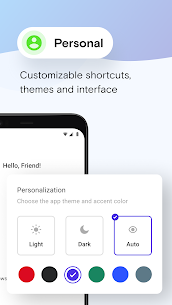
- Customisable interface: ability to set the address bar at bottom, toggle modes, ad-blocker support. :contentReference[oaicite:6]{index=6}
- Early access to AI assistant integration (Aria) in some regions/versions. :contentReference[oaicite:7]{index=7}
🟢 How to Use Opera Mini Browser Beta
- Visit the Google Play Store (or official site) and download “Opera Mini Browser Beta” — ensure you select the beta listing. :contentReference[oaicite:8]{index=8}
- Install the app and grant necessary permissions (internet access, storage if needed for media downloads).
- Open the browser, explore the new UI and settings; you may find a “Try new features” or “Beta features” toggle.
- Use the browser in normal browsing sessions: try grouping tabs, using the improved media download panel or adjusting layout settings.
- Since it’s a beta version: expect occasional bugs or instability — you can switch back to the stable version if needed.
Download Opera Mini Browser Beta (Official Link)
👍 Pros & Cons
| Pros | Cons |
|---|---|
| Lightweight browser ideal for data-limited or older devices. | As a beta version, some features may be experimental or unstable. :contentReference[oaicite:9]{index=9} |
| Early access to upcoming features (AI assistant, tab-grouping, improved UI). | Beta may receive frequent updates which some users find disruptive. |
| Strong data saving and media-download support. | Some sites or extensions may not work perfectly due to beta nature or accelerated features. |
💡 Why Use the Beta Version?
If you enjoy testing new features before public rollout, want access to enhancements like tab-grouping or built-in AI, or use a device where data and performance matter, then Opera Mini Browser Beta is a smart choice. However, if you prefer maximum stability, stick to the standard version until features mature.
🧠 Tips for a Better Experience
- Enable data-savings mode when on slow or expensive mobile networks.
- Use the tab-search or grouping features to keep browsing sessions organised — useful if you open many tabs. :contentReference[oaicite:10]{index=10}
- If you encounter bugs, report them via the app’s beta feedback channel to help improve the product.
- Keep the app updated since beta builds often deliver fixes and new features fast. :contentReference[oaicite:11]{index=11}
- Backup bookmarks or important data periodically — beta versions may reset or change behaviour unexpectedly.
🔄 Alternatives & Similar Browsers
- Google Chrome – full-featured stable browser.
- Microsoft Edge – browser with built-in ad-block and collections.
- Mozilla Firefox – open source with strong privacy focus.
❓ Frequently Asked Questions (FAQ)
Is Opera Mini Browser Beta free to download?
Yes – the app is free to install. Since it’s a beta version, you’re testing features and may need to accept updates early.
Does the beta version still save data like the regular Opera Mini?
Yes – the compression/data-savings technology remains a key advantage of Opera Mini. Some newer features may require more resources, but data-saving mode is retained. :contentReference[oaicite:12]{index=12}
Can I switch back to the stable version if I don’t like the beta?
Yes – you can uninstall the beta and reinstall the stable version of Opera Mini or browser of your choice. Make sure you backup your data if needed.
🧾 Disclaimer
apknest.app does **not** host, upload or distribute any APK files. This review is for informational and discovery purposes only. Ensure you download the app from official store links.
📊 Meta Information
Focus Keyword: Opera Mini Browser Beta review 2025
Meta Title: Opera Mini Browser Beta – Features & Download (Official Link) – 2025
Meta Description: Try the Opera Mini Browser Beta – test early access features like data savings, tab-grouping, in-browser AI and media download panel. Read our 2025 review with pros & cons and official link.
What's new
- AdBlock is now available in Direct (no compression) mode
- You can now set address bar to the bottom of the screen
- Various stability and performance fixes
Images




Related apps








Best Rated Apps
-
 Careem: Rides, Food & more25.38 Careem
 -
Proton VPN: Fast & Secure VPN5.14.2.0 Proton AG
-
Google Ads – Manage Your Campaigns Anytime, AnywhereVaries with device Google LLC
-
Call of Duty®: Mobile1.0.52 Activision Publishing Inc.
-
Opera Mini browser betaVaries with device Opera
-
Snap Master VPN: Super Vpn App8.2.0.2 SECUREGUARD GROUP PTE. LTD.
-
MyTelkomsel Apk v7.1.0 Download For Androidv7.1.0 Telkomsel
-
Snap Master VPN – Unlimited Free VPN for Android!8.1.3.1 SECUREGUARD GROUP PTE. LTD.
-
Google Maps Go APK – Lightweight Navigation for All DevicesVaries with device Google LLC
-
Google Analytics – Your Business Pulse, Always Within ReachVaries with device Google LLC
-
-
Top New Games
-
Clash of Clans17.477.13 Supercell
-
PUBG MOBILE4.0.0 Level Infinite
-
Call of Duty®: Mobile1.0.52 Activision Publishing Inc.
-
Ludo King®Varies with device Gametion
-
PUBG MOBILE LITE0.27.0 Level Infinite
-
Genshin Impact – Explore a Boundless Fantasy World5.8.0_35245262_35356052 COGNOSPHERE PTE. LTD.
-
League of Legends: Wild Rift – The Ultimate Mobile MOBA Experience6.2.0.8711 Riot Games Inc
-
NEW STATE : NEW ERA OF BR0.9.85.720 KRAFTON Inc.
-
456 Run Challenge: Clash 3D – Survival Game Adventure12.0.3 Amobear Studio
-
Garena Free City1.1.1 Garena Mobile Private Limited
-


