
WhatsApp Messenger APK: Everything You Need to Know
WhatsApp LLC
Oct 18, 2010
Oct 4, 2025
Varies with device
Varies with device
10,000,000,000+

Description
Introduction to WhatsApp Messenger APK
Have you ever wondered why millions of people around the world can’t live without WhatsApp? Whether it’s for chatting with friends, family, or colleagues, WhatsApp has become an essential part of daily life. But did you know you can enjoy WhatsApp even without using the Play Store? That’s right! Enter WhatsApp Messenger APK.
What is an APK?
An APK (Android Package Kit) is the file format used by Android to distribute and install apps. Think of it as a package that contains all the necessary components for the app to run on your device. Using an APK allows you to install apps manually, bypassing app stores.
Why WhatsApp APK is Popular
WhatsApp APK is popular because it allows users to access the latest features before they are rolled out officially. It’s perfect for users with devices that may not have access to the Google Play Store or who want to install apps offline.
Features of WhatsApp Messenger APK
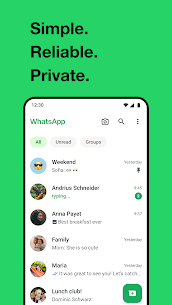
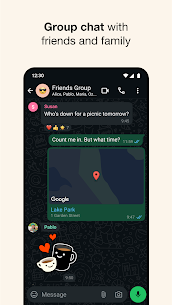
Instant Messaging
WhatsApp APK lets you send text messages instantly. You can create individual or group chats, share emojis, GIFs, and even stickers to express your emotions better.
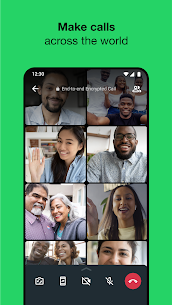
Voice and Video Calls
The APK supports high-quality voice and video calls. Imagine catching up with friends across continents without worrying about international calling charges—just Wi-Fi or data, and you’re set.
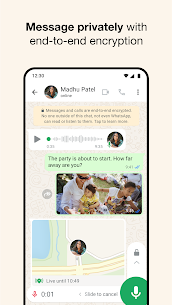
Multimedia Sharing
Send photos, videos, documents, and even locations with ease. WhatsApp APK ensures your files are delivered quickly and safely, even large video files.
WhatsApp Web & Cross-Device Support
Access WhatsApp from your PC, tablet, or secondary devices with WhatsApp Web. The APK ensures your chats sync seamlessly across devices.
Status Updates & Stories
Share your day in photos, videos, or text with friends. Status updates disappear after 24 hours, making them perfect for daily snippets of life.
Benefits of Using WhatsApp APK
Early Access to New Features
APK users often get the latest features earlier than those using the Play Store version. Want to test a new sticker pack or interface? APK is your go-to.
Compatibility Across Devices
Not all devices support the Play Store. With WhatsApp APK, you can install it on older Android devices or custom ROMs that don’t have Google services.
Offline Installation
With APK, you don’t need an internet connection to install the app once the file is downloaded. Perfect for low-bandwidth environments or travel.
How to Download WhatsApp Messenger APK Safely
Official Sources vs Third-Party Websites
Always prefer official sources, like WhatsApp.com, for downloading the APK. Third-party sites may host modded versions, which could compromise security.
Step-by-Step Installation Guide
- Download the APK from the official site.
- Open the file in your downloads folder.
- Follow on-screen prompts to install.
- Launch the app and verify your phone number.
Enabling Unknown Sources on Android
For older devices, you may need to allow installations from unknown sources. Go to Settings > Security > Unknown Sources and enable it temporarily.
Troubleshooting Common Issues
WhatsApp APK Not Installing
Ensure your device has enough storage. Clear cache or remove previous versions before reinstalling.
Installation Failed Errors
Check if the APK is compatible with your Android version. Always download the latest version from official sources.
App Crashes or Freezing
Restart your device, clear the app cache, or reinstall the APK if the issue persists.
Modded WhatsApp APKs: Pros and Cons
Popular Mod Versions
Mods like GB WhatsApp or WhatsApp Plus offer extra themes, customizations, and privacy features.
Risks and Security Concerns
While mods are tempting, they carry high risks: potential malware, account bans, and privacy breaches. Stick to official APKs for safety.
Updating WhatsApp APK
Automatic Updates vs Manual Updates
APK updates can be manual or automatic. For security, always update from official sources to avoid vulnerabilities.
Tips for Safe Usage of WhatsApp APK
Backup Chats Regularly
Use cloud or local backups to prevent data loss during installation or updates.
Verify APK Signatures
Ensure the APK file is signed and official. This protects against malware or tampered versions.
Avoid Mod APKs for Security
Mods may sound fun, but they can compromise your device and personal data. Official APKs are always the safest choice.
Conclusion
WhatsApp Messenger APK is a fantastic way to enjoy instant messaging, voice/video calls, and multimedia sharing with enhanced flexibility. Whether you’re seeking early access to features or need offline installation, the APK gives you control over your WhatsApp experience. Just remember: always prioritize safety, download from official sources, and back up your data regularly.
FAQs
Q1: Is it safe to download WhatsApp APK from third-party websites?
A1: It’s risky. Always download from official sources to avoid malware and security issues.
Q2: Can I install WhatsApp APK on devices without Google Play Store?
A2: Yes! APK installation allows you to bypass the Play Store, perfect for older or custom devices.
Q3: Do I lose my chat history when installing WhatsApp APK?
A3: Not if you back up your chats before installation. Cloud or local backups are recommended.
Q4: What is the difference between official APK and modded APK?
A4: Official APK is safe and compliant, while modded APK offers extra features but carries security and privacy risks.
Q5: How can I update WhatsApp APK safely?
A5: Update only from the official WhatsApp website or app to avoid compromised versions.
What's new
Instant Messaging
WhatsApp APK lets you send text messages instantly. You can create individual or group chats, share emojis, GIFs, and even stickers to express your emotions better.
Voice and Video Calls
The APK supports high-quality voice and video calls. Imagine catching up with friends across continents without worrying about international calling charges—just Wi-Fi or data, and you’re set.
Multimedia Sharing
Send photos, videos, documents, and even locations with ease. WhatsApp APK ensures your files are delivered quickly and safely, even large video files.
WhatsApp Web & Cross-Device Support
Access WhatsApp from your PC, tablet, or secondary devices with WhatsApp Web. The APK ensures your chats sync seamlessly across devices.
Status Updates & Stories
Share your day in photos, videos, or text with friends. Status updates disappear after 24 hours, making them perfect for daily snippets of life.
Images

Related apps









Best Rated Apps
-
 Careem: Rides, Food & more25.38 Careem
 -
Proton VPN: Fast & Secure VPN5.14.2.0 Proton AG
-
Google Ads – Manage Your Campaigns Anytime, AnywhereVaries with device Google LLC
-
Call of Duty®: Mobile1.0.52 Activision Publishing Inc.
-
Opera Mini browser betaVaries with device Opera
-
Snap Master VPN: Super Vpn App8.2.0.2 SECUREGUARD GROUP PTE. LTD.
-
MyTelkomsel Apk v7.1.0 Download For Androidv7.1.0 Telkomsel
-
Snap Master VPN – Unlimited Free VPN for Android!8.1.3.1 SECUREGUARD GROUP PTE. LTD.
-
Google Maps Go APK – Lightweight Navigation for All DevicesVaries with device Google LLC
-
Google Analytics – Your Business Pulse, Always Within ReachVaries with device Google LLC
-
-
Top New Games
-
Clash of Clans17.477.13 Supercell
-
PUBG MOBILE4.0.0 Level Infinite
-
Call of Duty®: Mobile1.0.52 Activision Publishing Inc.
-
Ludo King®Varies with device Gametion
-
PUBG MOBILE LITE0.27.0 Level Infinite
-
Genshin Impact – Explore a Boundless Fantasy World5.8.0_35245262_35356052 COGNOSPHERE PTE. LTD.
-
League of Legends: Wild Rift – The Ultimate Mobile MOBA Experience6.2.0.8711 Riot Games Inc
-
NEW STATE : NEW ERA OF BR0.9.85.720 KRAFTON Inc.
-
456 Run Challenge: Clash 3D – Survival Game Adventure12.0.3 Amobear Studio
-
Garena Free City1.1.1 Garena Mobile Private Limited
-


